10 Important Places to Put Keywords to Maximize SEO [Infographic] (2024)

Table of Contents

SEO Reference Guide and Infographic:
10 Places to Put Keywords on a Webpage

Share this infographic on your site.

10 Places to Put Keywords on a webpage infographic 2024

Introduction to On-Page SEO

So, you’ve done your keyword research, and hopefully have chosen a long-tail keyword that’s not too competitive.

And a keyword that you have not gone after already.

Don’t cause keyword cannibalization by targeting the same keyword for multiple pages on your website.

You’ll be competing with yourself, and that’s not good practice, to say the least.

Use variations and synonyms for the keyword throughout the body of the page.

Don’t place the keyword in every sentence.

This is called keyword stuffing and makes your content spammy.

The searchers don’t like it, and neither do the search engines.

Write for the reader, not the search engine.

In this guide, we’ll focus on places to put keywords on a webpage for maximum Search Engine Optimization (SEO.)

The goal of SEO is to increase the rank of your page on the Search Engine Results Page (SERP.)

The ultimate goal is to capture the #1 position, both in the SERP and – for local SEO – in the Map-pack.

Getting into one of the top 3 positions would be great.

Getting on Page One would be good.

But if you’re not on Page One then your page is almost invisible, since 75% of searchers don’t scroll past page one.

There are many SEO techniques that improve a webpage’s ranking.

We’ll focus on on-page SEO in this guide.

Doing on-page SEO alone won’t get you to page one, but it’s a good place to start.
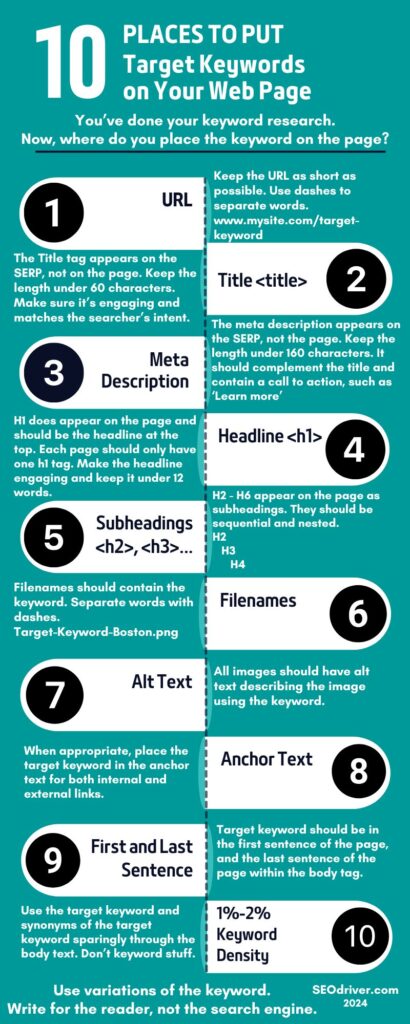
Here are the 10 places to put keywords on a webpage

URL

Keep the URL as short as possible. Use dashes to separate words.

Example: mysite dot com/target-keyword.

It would be great if your domain has a keyword, but this can only take you so far.

But if you’re a dentist in Boston, MA and the domain DentistInBostonMA dot com is available, you should probably buy it.

You should put the keyword in the URL slug, which is what comes after the ‘/’ forward slash.

For example, look at the URL for this page SEOdriver dot com/blog/10-Places-to-put-keywords.

Having the keyword in the URL helps the search engines understand what the page is about and hopefully see it as relevant to a user’s search intent.

Title Tag

The Title tag is in the head section of the page, so it appears on the SERP, but not on the webpage.

When your webpage appears in the search results, the title tag is the first thing people see.

Keep the length under 60 characters so it doesn’t get cut off on desktop, tablet, or mobile devices.

Make sure it’s engaging and matches the searcher’s intent so that they’re more likely to click on it.

Note: The Title and H1 should be different even though they both will contain the keyword.

More on the H1 tag later.

HTML code showing the syntax of the Title tag, which is one of the places to put keywords

Meta Description

Like the title tag, the meta description is in the head section.

It appears under the title on the SERP, but not on the webpage.

Keep the length to no more than 155 characters so it doesn’t get cut off.

It should complement the title and contain a call to action such as, ‘Lean More.’

When a user performs a search, the search engine will highlight the search term they entered if it is contained in the meta description, making it more noticeable.

The meta description isn’t a ranking factor, but it should be persuasive copy to make the searcher want to click.

And click-through-rate does impact rank.

Note that even if you specify a page title and a meta description, Google may display something different.

HTML code showing the syntax of the Meta Description, which is one of the places to put keywords

H1

The H1 heading is in the body tag so it does appear on the webpage and should be the headline at the top.

This helps to determine the relevance of the page to a user’s search query.

Each page should only have one H1 tag.

Keep the headline around 12 words. Make it compelling so the visitor wants to keep reading.

As stated earlier, the Title and H1 should differ, but both should contain the keyword.

So, the title is, “10 Places to Put Keywords on a Webpage [Infographic] (2024)”

Note that the title is under 60 characters.

And the H1 is, “10 Important Places to Put Keywords to Maximize SEO [Infographic] (2024)”

Note the H1 is 11 words – if you count numbers as words.

H2, H3...

H2 – H6 tags appear on the page as subheadings.

These heading tags are important for the structure and readability of your content.

They’re usually subheadings which break up your text and make it easier for readers to skim and find the information they’re looking for.

You can have multiple of each, but they should be sequential and nested.

For example, if the keyword is “long tail keywords” then the formatting would look something like this.

H2=”What is a long tail keyword?”

    H3=”Why are long tail keywords important?”

         H4=”How to know if a long tail keyword is too competitive.”

H2=”5 ways to conduct keyword research to choose long tail keywords for your content.”

Having the heading tags sequential and nested is important for SEO, but also important for accessibility.

It makes it easier for screen readers and other assistive devices used by people with disabilities.

Filenames

Take the time to rename your images and other files or media to include the keyword.

Separate the words by dashes.

When you include relevant keywords in your image filenames, it helps Google understand what the image (and by extension, the page) is about.

You’re wasting an opportunity if your files are named something like IMG-123.jpg instead of Dentist-Boston-MA-root-canal.png

Some screen readers will read out the filename if the image doesn’t have any Alt Text – which we’ll review next.

Alt Text

All images should have Alt Text describing the image using the keyword.

The search engine algorithms read text, not images – although AI is changing this.

So the Alt Text provides context for the image and therefore the webpage.

Alt Text is also important for accessibility.

A screen reader will read the Alt Text for visitors who may be visually impaired or have other disabilities.

Keeping Alt Text under 125 is good practice. Be descriptive but concise.

Remove words like “Image of…” or “Photo showing…”

Something like “Woman sitting at an office desk in front of a laptop. She’s reading a blog about places to put keywords.”

If you can’t work the keyword in so that it makes sense, then it’s more important to have the Alt Text describe the image in the best way to make it accessible, even if that means removing the keyword.

HTML code showing the syntax of an image's Alt Text, which is one of the places to put keywords

Anchor Text

Your page should always have internal and external links.

When appropriate, place the target keyword in the anchor tag for both internal links and external links.

When you use a keyword in the anchor text, it gives search engines a clue about the content of the page you’re linking to.

Hopefully the webpage you’re linking to (whether it’s your own, or an external resource) is related to the keyword topic.

But if it’s not, remember to create content for the reader and not the search engine.

Don’t sacrifice readability just to have the keyword in the anchor text.

As a side note, since the anchor text is a link, it should be underlined.

Try to avoid underlining anything that isn’t a link.

This can confuse screen readers and the people who use them.

Use bold or italics if you want a phrase to stand out.

HTML code showing the syntax of an link's Anchor Text, which is one of the places to put keywords

First and Last Sentence

Target keyword should be in the first sentence of the page which would be in the introduction, and the last sentence of the page which would be in the conclusion.

If you don’t put the keyword in first sentence, then use it by at least the first 140 words.

Use the keyword evenly but sparingly throughout the blog, article etc.

Use variations of the keyword and synonyms, plus related terms, and LSI keywords.

So, for the keyword ‘places to put keywords’ – synonyms might be ‘target keyword placement’ or ‘spots on your webpage to use keywords.’

Related terms might be ‘webpage optimization’ or ‘increase the rank of your page.’

Latent Semantic Indexing (LSI) keywords help connect relationships between words and phrases so search engines can understand the context of the keyword.

LSIs are not synonyms of the keyword. They give context to the keyword.

For example, if the keyword was “Copy” then an LSI might refer to writing or advertising, so the search engine understands that “Copy” means the words on the page.

For the same example of the keyword “Copy”, an LSI might refer to a printer, or to replicating documents, so the search engine understands that “Copy” refers to the reproduction or duplication of an original.

Body of the page – 1%-2% Keyword Density (KD)

As stated earlier, don’t keyword stuff.

Repeating the keyword over and over won’t help your page rank higher.

In fact, Google may penalize your page and lower the rank.

Plus, people aren’t going to read a spammy blog post or article.

The exact target keyword should be less than 2% of the content in the body of the page.

Spread out the use of the keyword through the page.

So, a 2,000-word piece should use the keyword less than 40 times.

And I’d suggest that it be closer to only 20 times.

Read your blog or article out loud and see if the keyword is used so much that it’s echoing in your ear.

If it is, remove the excessive keyword use until the article reads smoothly.

This blog post is about 1,750 words, and the exact keyword is used eleven times which is under 1%.

Key Takeaways

On-page SEO alone probably won’t get you to page one unless your keyword has no competition.

There are many other factors that impact page rank: page speed, backlinks, competition and more.

Getting ranked in the top-3 positions requires several techniques that when used together, give your webpage the best chance to rank higher.

The goal is to make it as easy as possible for search engines to understand your content.

This can lead to higher rankings in the SERP, which can drive more traffic to your webpage.

Remember, it’s important to maintain a natural readable flow.

Overstuffing your page with a keyword can lead to a poor user experience and even harm your SEO efforts.

Following the above list of places to put keywords, doesn’t guarantee you’ll be on Page One, but it’s a good start.

About SEODriver.

Our digital marketing services are tailored to your business’ unique goals.

We assess where you are, and understand where you want to be, so we can recommend the best strategy for you.

Schedule your free strategy call today!

Author

About Us

SEODriver specializes in optimizing your online assets to drive more free organic traffic to your business.

Take your business to the next level.

1-(617)-485-0808
Boston MA

Digital Marketing Agency Boston MA

Grow Your Local Business With Us.

Schedule your strategy call so we can perform a free assessment of the current state of your online presence.